

How Content is organized
Content is built around two objects:- A Brief is the plan. It captures the target intent, recommended structure, and the evidence/citations that matter for the prompts you want to win.
- An Article is the draft output generated from the brief. You can edit it, refine it, and publish it to your CMS.
- Create a brief (from Opportunities or manually)
- Review the brief
- Generate an article
- Refine and publish
- Measure impact in Analytics
The Content list (columns and statuses)
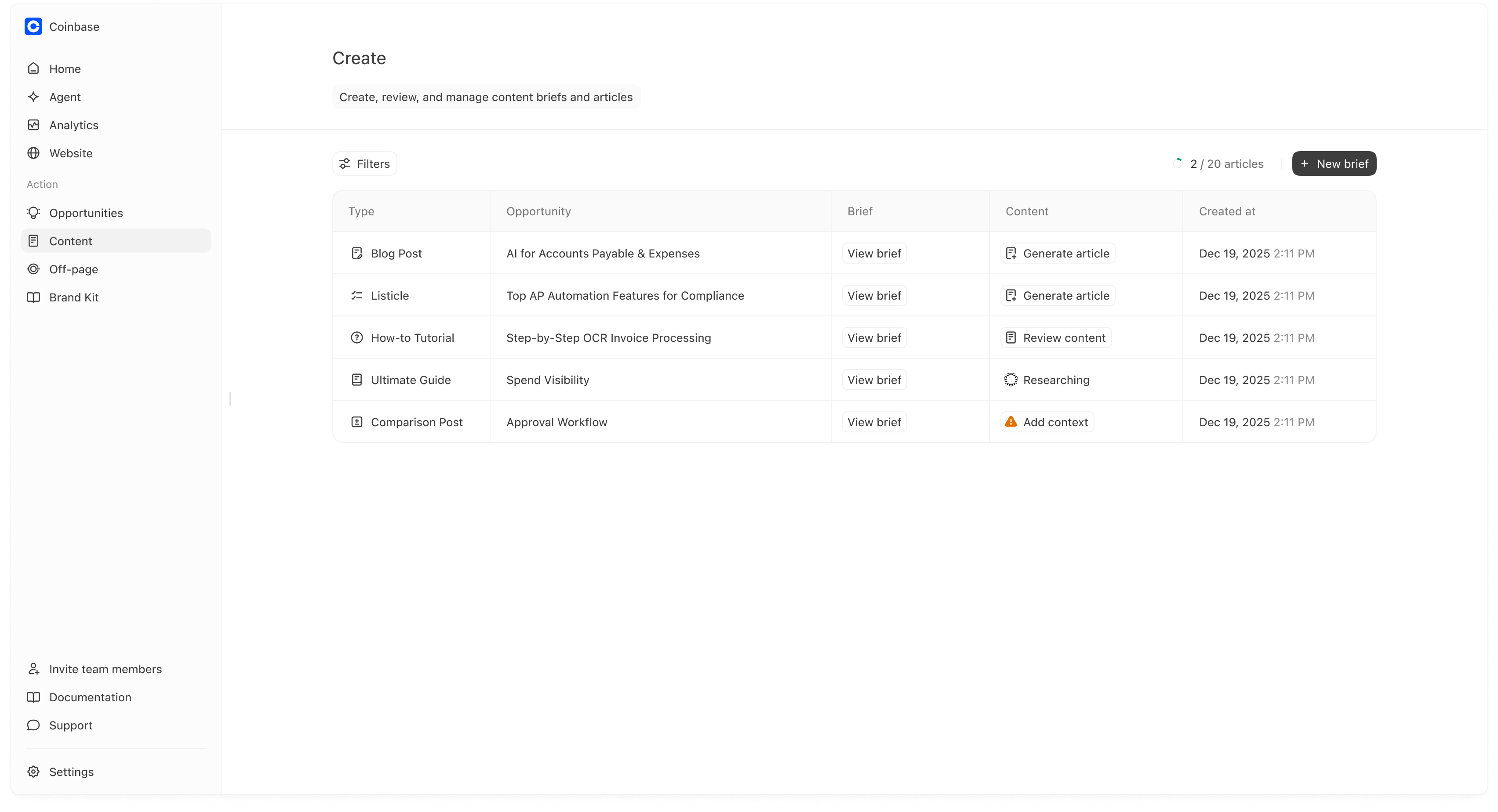
The main table is your content pipeline. Each row is one piece of content in progress.Columns
- Type: The format (Blog Post, Listicle, How-to Tutorial, Ultimate Guide, Comparison Post).
- Opportunity: If the item came from Opportunities, this shows the originating recommendation. If you created it manually, this may be blank or reflect the manual title.
- Brief: A shortcut to open the brief (typically View brief).
- Content: The next step or action (Generate article, Review content, Researching, Add context).
- Created at: when the brief was created.
What the Content status means
- Generate article The brief is ready. Clicking this will create a full draft article from the brief.
- Review content The article is drafted and ready for review.
- Researching Meridian is still assembling inputs for the brief/article.
- Add context Meridian needs additional inputs before it can generate a high-quality output. This typically happens when your prompt/topic is broad or when the system cannot confidently infer the right angle, constraints, or sources. Adding a bit of context here usually improves quality significantly.
The “X / Y articles” indicator in the top right reflects your plan usage (how many article generations you have used out of your plan limit).
Creating a new brief
You can create briefs in two ways:- From Opportunities (recommended when you want the highest-impact suggestions), or
- Directly from Content using New brief (recommended when you already know what you want to write).
Option A: Create a brief from Opportunities
Opportunities is a good starting point when you want Meridian to pick topics that are most likely to increase visibility and citations for your tracked prompts. A typical flow:- Open Opportunities
- Pick a High (or Medium) item
- Click Generate brief
- Return to Content to find the new row and click View brief
Option B: Create a brief directly in Content
Click New brief to open the content type chooser.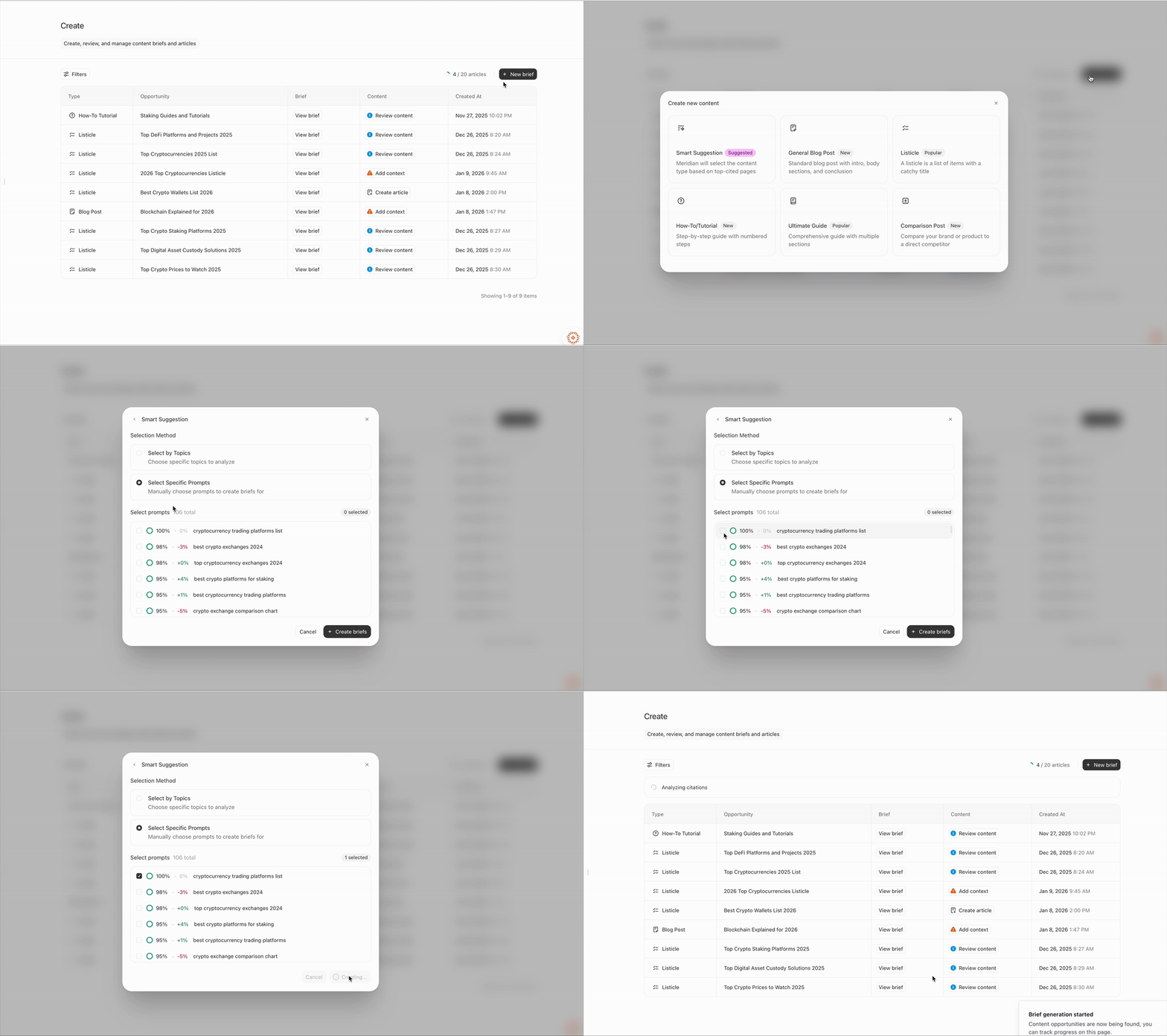
- Smart suggestion (Suggested): Meridian chooses the best content type based on what sources are most cited for your selected topics/prompts.
- General blog post: Best for informational topics where you want a clear intro + sections + conclusion.
- Listicle: Best for “best X” prompts and prompts that return a list of recommendations.
- How-to tutorial: Best for step-by-step prompts (“how do I…”).
- Ultimate guide: Best for broad topics that need comprehensive coverage.
- Comparison post: Best for “X vs Y” prompts or “best alternative to…” prompts.
Smart suggestion: choosing Topics vs Specific Prompts
If you select Smart suggestion, Meridian will choose the format we believe is most-likely to earn citations for the given prompt or topics.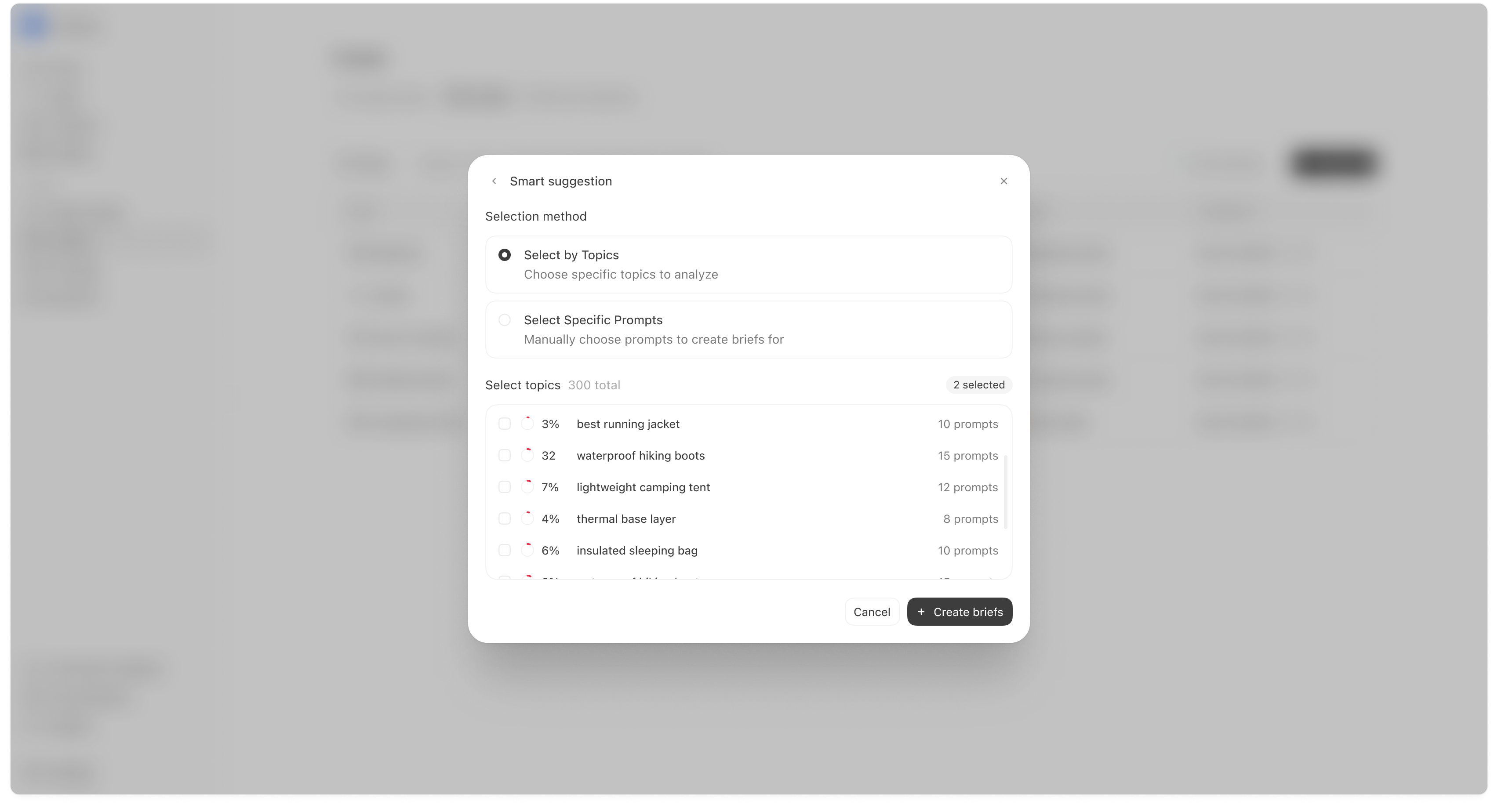
- Select by Topics Choose one or more Topics. Meridian will look at the prompts inside those topics and generate briefs that best match the citation ecosystem and content gaps.
- Select Specific Prompts Choose the exact prompts you want to write for. This is useful if you have a short list of “money prompts” you are actively trying to win.
Reviewing a brief (what to check before generating an article)
Opening View brief shows the brief editor. This is where you validate that the plan matches your goal before generating a full draft.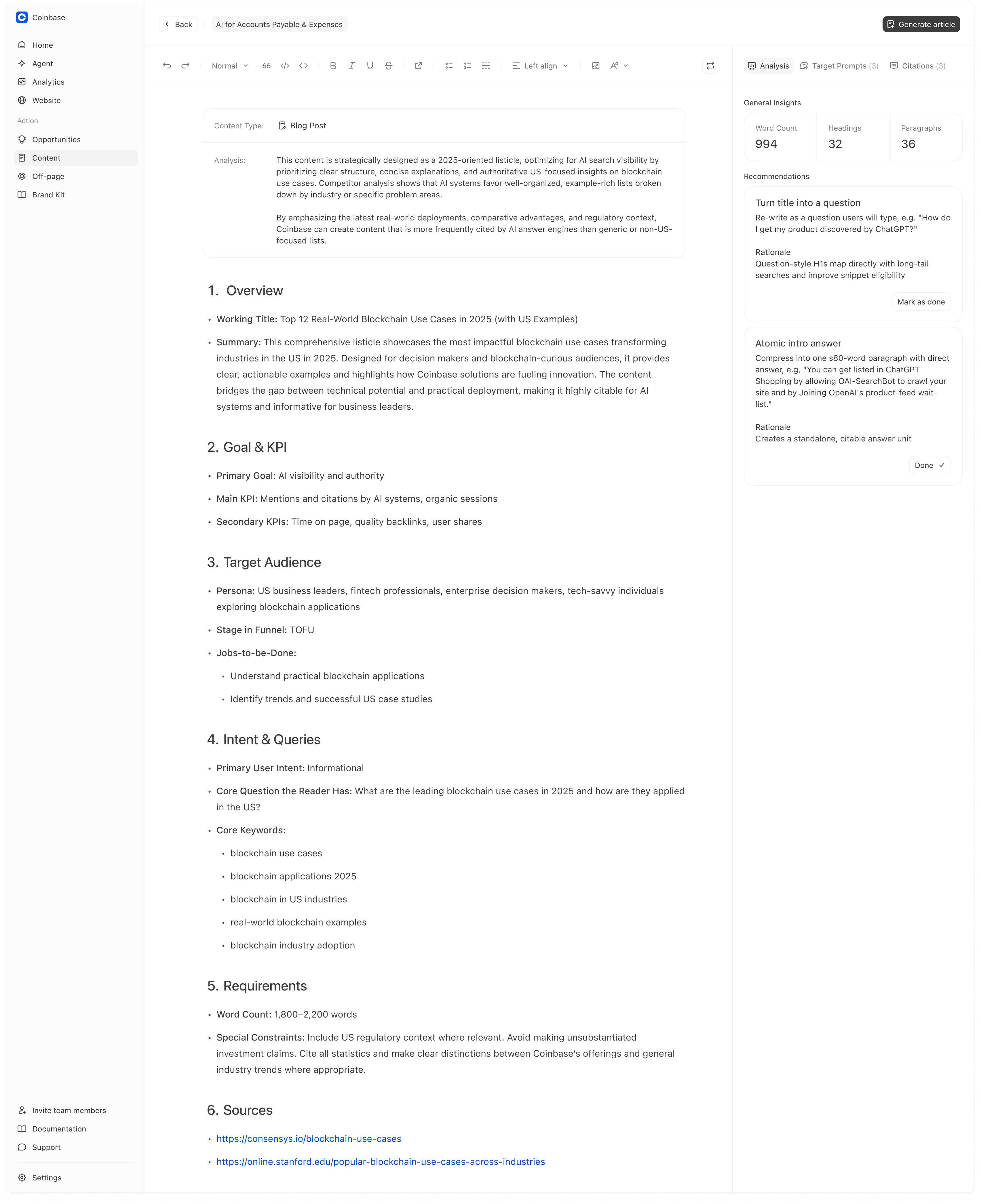
Target Prompts (right rail)
The Target Prompts panel shows which prompts this brief is designed to win and your current visibility on those prompts. This is important because content only improves visibility if it maps to the prompts you are actually tracking. Practical checks:- Are the target prompts the ones you care about?
- Are they in the right topic/category?
- Are you missing prompts that should obviously be included for this content?
Citations (right rail)
The Citations panel shows the sources that are currently winning visibility for this prompt set. This is useful because:- It tells you which sources AI already trusts for this query
- It helps you align your content to that ecosystem (structure, evidence, comparable claims).
Recommendations (right rail)
Recommendations are small, concrete improvements Meridian suggests for AI visibility. For example:- “Turn title into a question”
- “Atomic intro answer”
- other structural/citeability improvements
Brief quality matters. A 2-minute review before generating an article usually saves you a lot of editing later and produces content that performs better in AI answers.
Reviewing and refining the article
After generation, you’ll land in the article editor.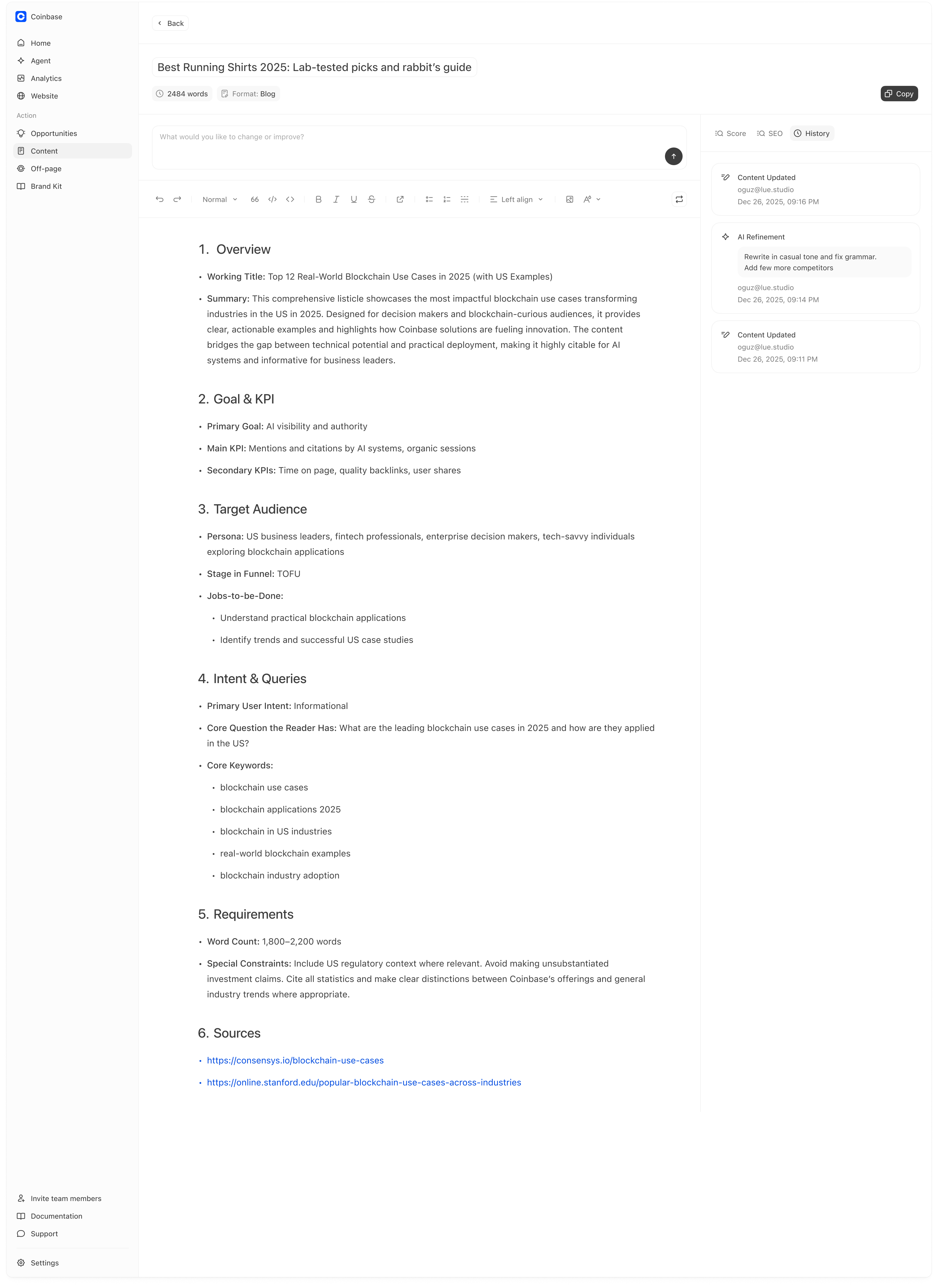
Editing the draft (what usually matters most)
Before publishing, review the draft for:- Correctness (facts, claims, pricing, availability)
- Specificity (examples, numbers, concrete criteria)
- Structure (headings that match the prompt intent)
AI Refinement (targeted edits)
At the top of the editor you can request changes via the refinement input (e.g., “Rewrite in a more casual tone and add 3 competitor alternatives”). This is most useful when you give a specific instruction:- “Add a comparison table with these criteria…”
- “Rewrite the intro to answer the question in 2 sentences…”
- “Add an FAQ section with 8 questions about…”
- “Add evidence/examples for claims in section 3…”
Score / SEO / History
On the right rail you’ll see tabs such as:- Score (quality/structure signals)
- SEO (SEO-related checks)
- History (audit trail of edits and refinements)
Copy to publish
When you are ready, click Copy and paste into your CMS.Measuring impact after publishing
Content work should be measured against the prompts it was designed to influence. A simple measurement loop:- In Analytics → Prompts, watch visibility and prominence for the target prompts.
- In Analytics → Citations, watch whether your owned pages begin to appear more frequently as citations.
- On Home, watch whether KPI changes persist over the next period.
- You are not in the citation ecosystem yet (Off-page work needed)
- Your pages are not citeable (Website → Pages fixes needed)
- Or you are not tracking the prompts that would surface that content (prompt set mismatch)
Changes are not immediate, and not all content will lead to an increase in visibility.
Quality of content is significantly more important than quantity of content.
Quality of content is significantly more important than quantity of content.