

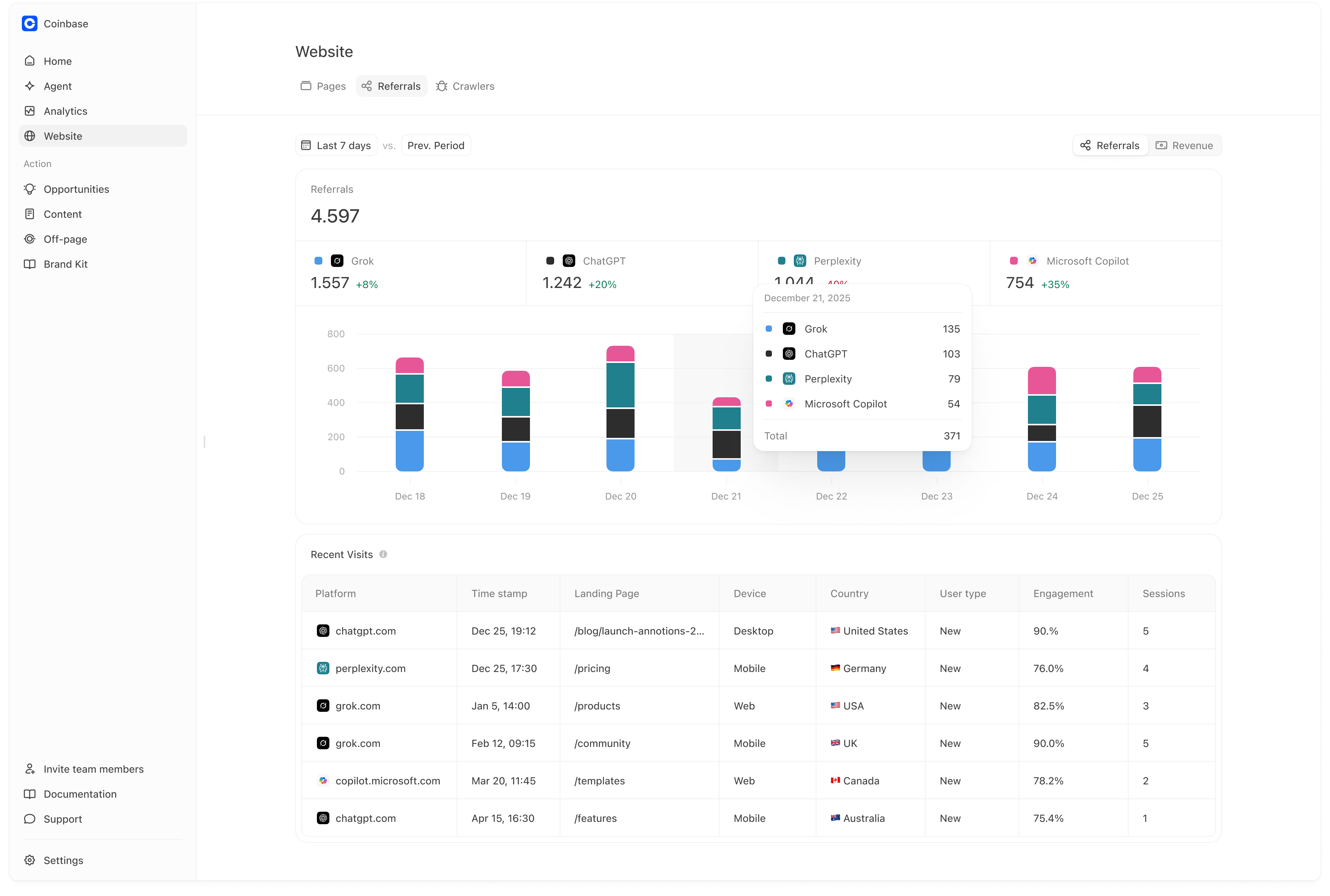
- It gives you a directional trend of whether AI-driven discovery is increasing over time (especially after you publish content, earn citations, or improve rankings).
- If you have ecommerce revenue tracked in GA, it can show revenue from AI-referred sessions (also directional).
Referrals is best used as a trend monitor, not as a complete ROI number. It only counts users who click directly from an AI platform to your site (and, for revenue, only those who convert within the tracked session).
Setup: link your Google Analytics property
Referrals uses your Google Analytics integration. If you haven’t selected a property yet, you’ll see an empty state prompting you to link/select one.- Go to Website → Referrals
- Click Select property
- Choose the GA4 property you want Meridian to use
Referrals view (click-through sessions)
The Referrals view shows sessions where GA attributes the session source to an AI platform domain (e.g., ChatGPT, Perplexity, CoPilot, etc.).What you see
- Total referrals for the selected time range
- Breakdown by platform (ChatGPT, Perplexity, Copilot, Grok, etc.) with period-over-period deltas
- A trend chart so you can see changes over time
- Recent Visits, including landing page, device, country, and engagement (helpful for debugging and optimization)
How teams use this
- Identify which AI platforms are driving the most click-through traffic.
- Identify the landing pages AI users hit most often, then improve those pages (clear value prop, FAQs, comparison criteria, internal linking).
- Use week-over-week changes to validate whether your AI visibility work is translating into more inbound sessions.
Practical example
If you publish a “Best basketball shoes” guide and then see:- more ChatGPT referrals over the next week,
- and more sessions landing on that guide URL,
Important nuance: this undercounts AI influence
Referrals is click-through tracking, not “total influence.” It only counts sessions where someone:- Sees a recommendation in an AI platform, and then
- Clicks through to your site in that moment (so GA records the referrer domain like
chatgpt.comorperplexity.ai).
- The user gets a recommendation in AI, then Google searches your brand and clicks a search result.
- The user reads the AI answer, leaves, and comes back later via direct, a bookmark, or another device.
- The user shares your brand with someone else, who then visits via a different channel.
How big is the gap (roughly)?
Public research strongly suggests direct clicks are a small fraction of “people who saw an AI answer.” Practical takeaway: It is normal for GA to capture only a small fraction of AI exposure. Use Referrals to monitor directional trend (up/down by platform and by landing page), not as a complete ROI number.Revenue view (optional)
If your GA4 property tracks revenue and ecommerce events, you can switch to the Revenue view.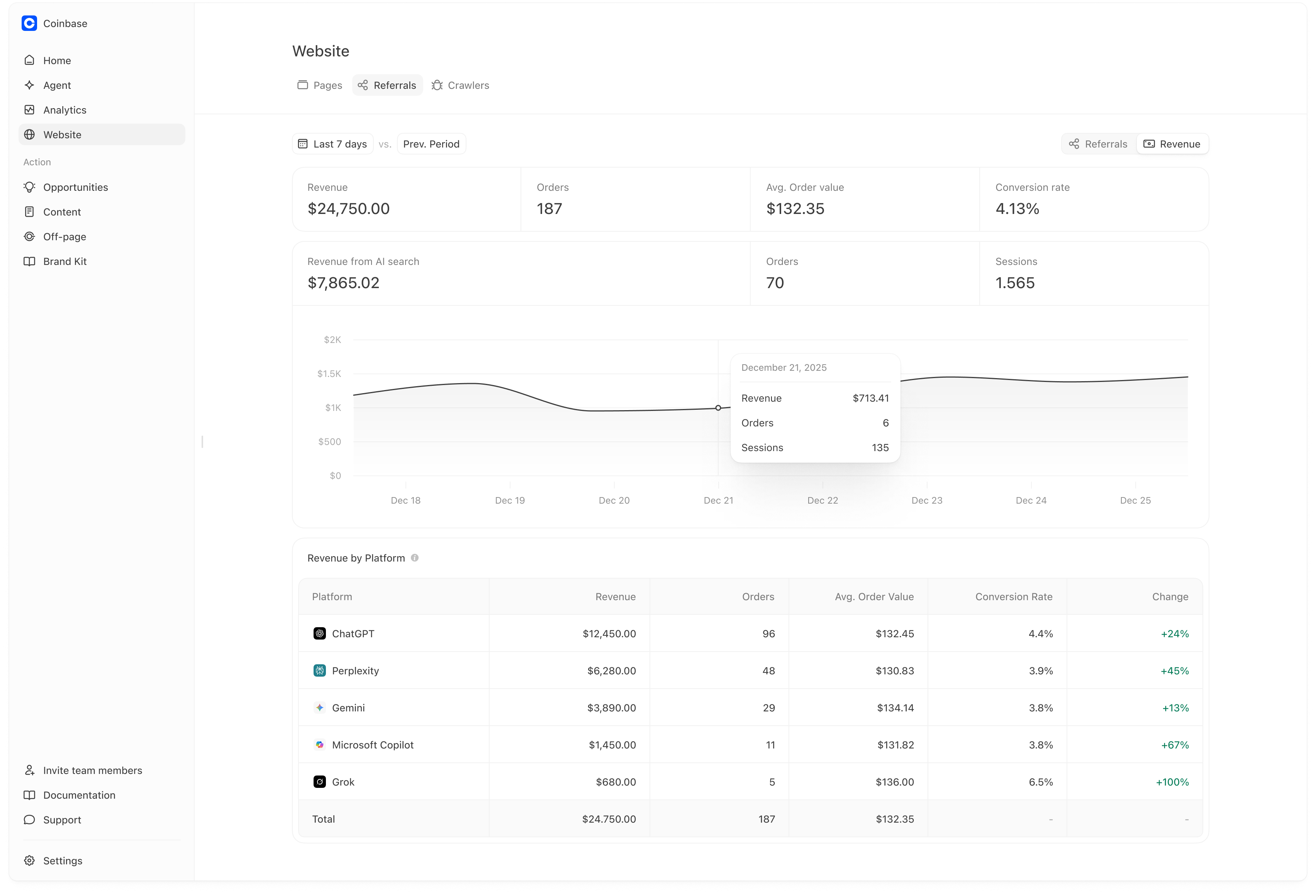
What you see
- Total Revenue, Orders, AOV, and Conversion Rate for the selected period
- Revenue from AI search (revenue attributed to sessions referred from AI platforms)
- A trend chart and Revenue by Platform table (which platforms are driving the tracked revenue)
When this is most useful
- You want directional evidence that AI referrals are not just visits, but also producing conversions.
- You want to compare which platforms drive higher conversion rates or AOV.
This “AI revenue” is a lower bound. It captures only conversions that happen in the measured click-through session (or attribution window configured in GA), and it will miss many “view-through” journeys where AI influenced the buyer but GA credits another channel later.